
How to Promote Antivirus, VPN & Utility Offers with Popunder Traffic: A Beginner’s Guide
Antivirus programs, VPN services, PC optimization tools, file cleaners, driver updaters, and mobile utilities solve clear, everyday problems. Users turn to them to protect their devices, improve privacy, free up storage, or make their computers and smartphones work more efficiently.
For affiliates, one of the most accessible ways to promote these products is through Popunder traffic, especially when it is combined with a relevant informational or system-style prelanding page.
In this guide, we explain how the funnel works, which angles and creatives to test, how to optimize campaigns, and how to stay compliant without relying on aggressive or misleading tactics.
Why Security and Utility Offers Work
Unlike many impulse-driven products, software offers are usually connected to a practical need. Users may be looking to:
- protect a device from online threats;
- improve privacy while browsing;
- secure a connection on public Wi-Fi;
- remove unnecessary files;
- free up storage space;
- improve computer performance;
- update drivers or manage startup programs;
- organize files, photos, or passwords.
These problems are relevant throughout the year and apply to a wide range of audiences. The main challenge is not always convincing users that they need software. It is helping them understand which problem the product solves and why they should consider it.
That is where a well-built prelander becomes valuable.
Why Popunder Traffic Works for Software Offers
Popunder ads appear behind the user’s active browser window and become visible when the current page is closed or minimized. This format can generate broad reach at a relatively low cost and works particularly well for products that need a short explanation before the user reaches the advertiser’s website.
Software offers are a good fit because users often need context before downloading or purchasing a product. A prelander can introduce the problem, explain the benefits of the software, and prepare visitors for the official product page.
Popunder traffic is commonly used for desktop antivirus and utility offers, while mobile traffic can be effective for Android utilities and VPN applications.
Push notifications can also be tested as an additional traffic source, especially when the message, device type, and landing experience are closely aligned.
The Typical Conversion Funnel
A common campaign funnel looks like this:
Popunder or Push (where permitted by the advertiser) → Informational or System-Style Prelander → Official Product Landing Page → Trial or Installation → Purchase.
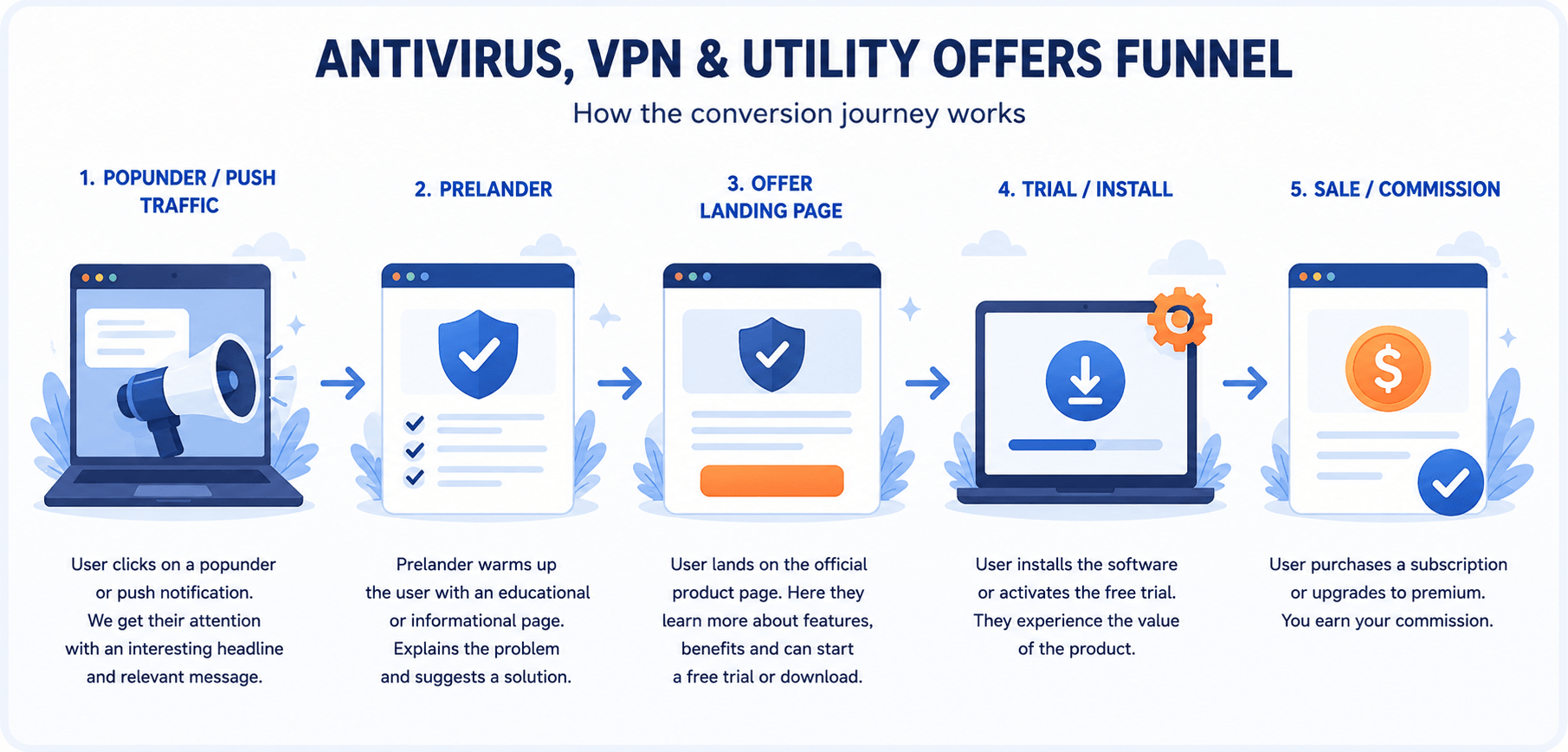
Figure 1. A typical conversion funnel for antivirus, VPN, and utility offers. The percentages shown are illustrative examples, not universal performance benchmarks.
Each stage has a different role.
Step 1: Popunder or Push Traffic
At this stage, the goal is to attract attention and generate relevant visits.
The ad should introduce a useful topic or benefit, such as:
- improving online privacy;
- checking device protection;
- securing a public Wi-Fi connection;
- freeing up storage;
- improving PC performance.
The creative should not attempt to convince users that their device is already infected, damaged, or in immediate danger.
Step 2: The Informational or System-Style Prelander
The prelander gives the user context before redirecting them to the advertiser.
Instead of immediately pushing a download, it can explain why a security or utility product may be useful.
Suitable prelander topics include:
- browser privacy tips;
- online safety recommendations;
- how VPNs help protect public Wi-Fi connections;
- signs that a computer may benefit from optimization;
- ways to free up smartphone storage;
- educational content about phishing, malware, or data privacy;
- comparisons of different security or utility solutions.
A strong prelander connects the traffic source with the offer. It should make the transition to the advertiser’s landing page feel logical rather than abrupt.
Step 3: The Advertiser Landing Page
After the prelander, users arrive on the official product page.
Depending on the offer, they may be able to:
- start a free trial;
- download the software;
- install an application;
- choose a subscription plan;
- purchase a license.
Because the user has already been introduced to the product category and its benefits, the advertiser’s page has a better chance of converting than when receiving completely cold traffic.
Step 4: Trial or Installation
Some offers convert after a direct purchase, while others use a free trial, download, or installation as an intermediate step.
At this stage, the user experiences the software and decides whether the product provides enough value to continue with a paid plan.
Step 5: Purchase and Commission
The final conversion may be a paid subscription, license purchase, upgrade, or another action defined by the offer.
Before launching a campaign, always check the exact conversion event, commission structure, attribution window, GEO restrictions, and traffic rules in the offer terms.
Why System-Style Prelanders Perform Well
Many software campaigns use interfaces inspired by security dashboards, system checks, browser notifications, or device settings.
These designs can attract attention because they look familiar and make the subject of the page immediately clear.
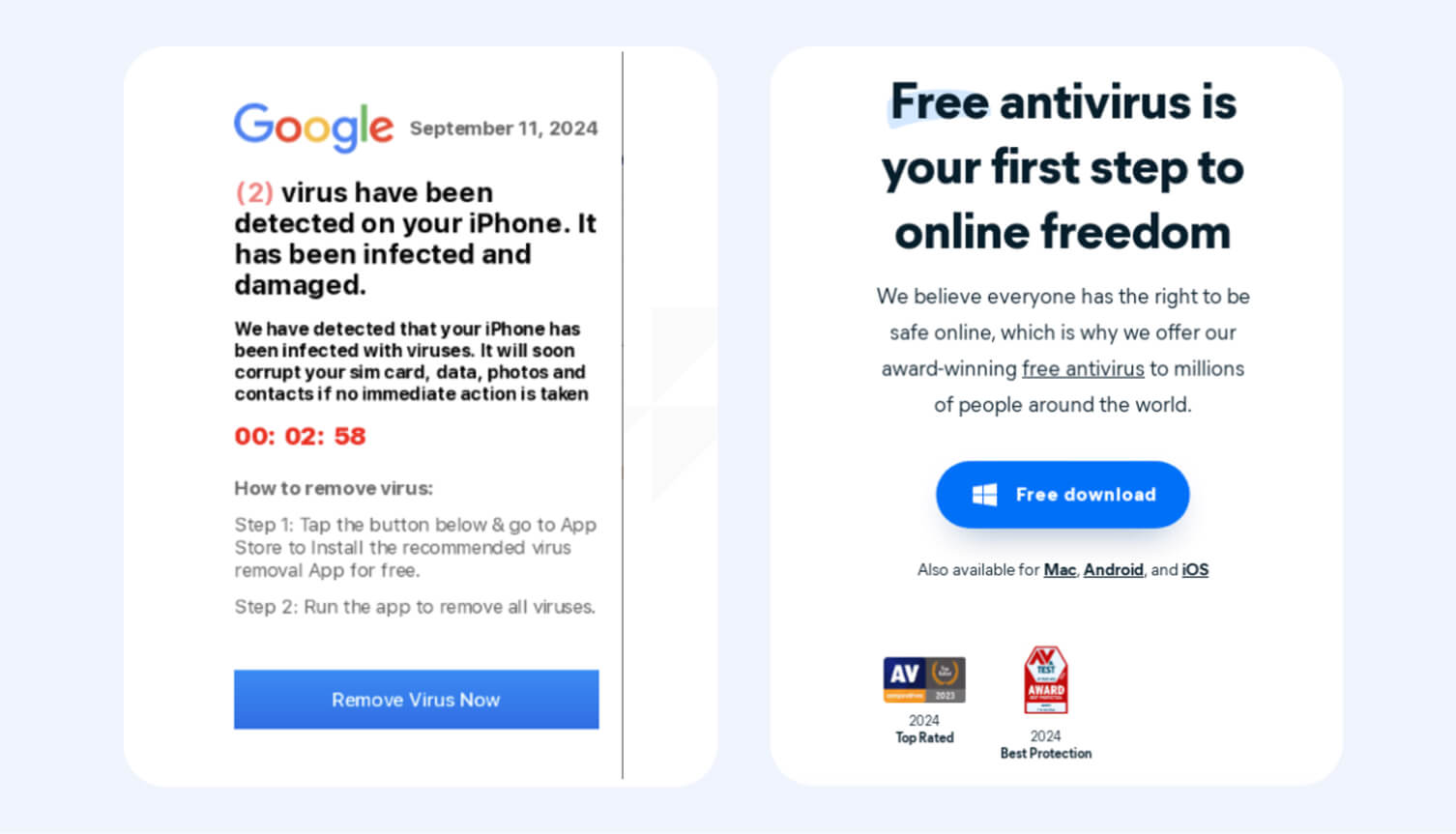
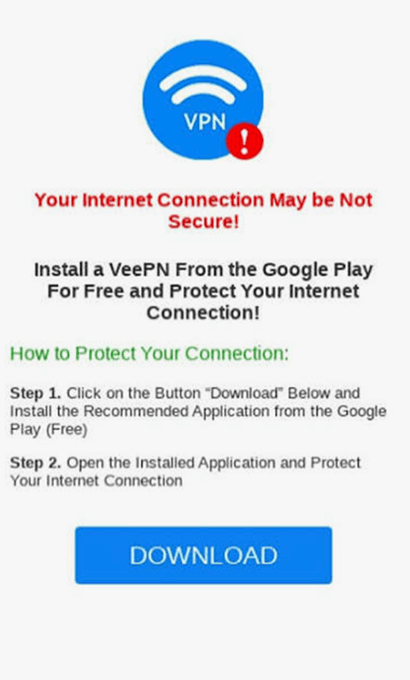
However, there is an important difference between a system-inspired informational page and a deceptive alert.
A compliant system-style prelander may say:
- “Check your current protection options.”
- “Learn how to improve your device security.”
- “Review ways to protect your connection.”
- “Discover tools that may help optimize your PC.”
It should not falsely claim that:
- the user’s computer is infected;
- malware has already been detected;
- a specific number of viruses has been found;
- the user’s phone is damaged;
- immediate installation is required;
- the message comes from Windows, macOS, Android, or another operating system.
Unless a real scan has been performed and the result is genuine, such claims are misleading and may violate advertiser or traffic-source policies.
Trust Converts Better Than Fear
Aggressive messaging may generate curiosity, but it can also lead to low-quality clicks, complaints, campaign rejection, and poor long-term performance.
Educational messaging attracts users who are genuinely interested in security, privacy, or device performance. These users are more likely to understand the product and make an informed decision.
Use neutral, benefit-focused language such as:
- “Protect your device from online threats.”
- “Check whether your PC is properly protected.”
- “Improve your online privacy.”
- “Learn how to browse more safely on public Wi-Fi.”
- “See whether your storage could use some cleanup.”
- “Discover tools that may help improve performance.”
The goal is to present software as a useful solution, not as an emergency response to a fabricated threat.
Which Offers Can Work with Popunder Traffic?
Antivirus Software
Antivirus products are easy for users to understand because the problem they address is familiar.
Common promotional angles include:
- real-time protection;
- malware detection;
- ransomware defense;
- phishing protection;
- safer browsing;
- protection for multiple devices.
Avoid claiming that a particular device is infected unless the advertiser’s product has genuinely detected a threat.
VPN Services
VPN offers can be promoted around privacy and connection security.
Relevant angles include:
- safer use of public Wi-Fi;
- encrypted internet traffic;
- increased privacy while browsing;
- protection of personal information;
- more secure remote work or travel connections.
Avoid unrealistic privacy guarantees or claims that a VPN makes users completely anonymous. Also review the advertiser’s rules before promoting streaming access or location-based content.
PC Optimization Utilities
Optimization products can appeal to users who want a faster, cleaner, or better-organized computer.
Examples include:
- disk cleanup tools;
- duplicate file finders;
- driver updaters;
- startup managers;
- storage analyzers;
- performance monitoring software;
- file recovery and disk management tools.
Focus on convenience and practical improvements rather than exaggerated promises such as “make any PC ten times faster.”
Mobile Utilities
Mobile utility offers can work especially well with Android traffic.
Popular use cases include:
- freeing up storage;
- organizing files;
- managing photos;
- finding duplicate content;
- improving privacy;
- monitoring device performance;
- securing internet connections.
Make sure the landing page and installation process are designed for the user’s mobile operating system.
Five Compliance-Friendly Prelander Concepts to Test
Affiliates can test several informational approaches depending on the product, audience, and device.
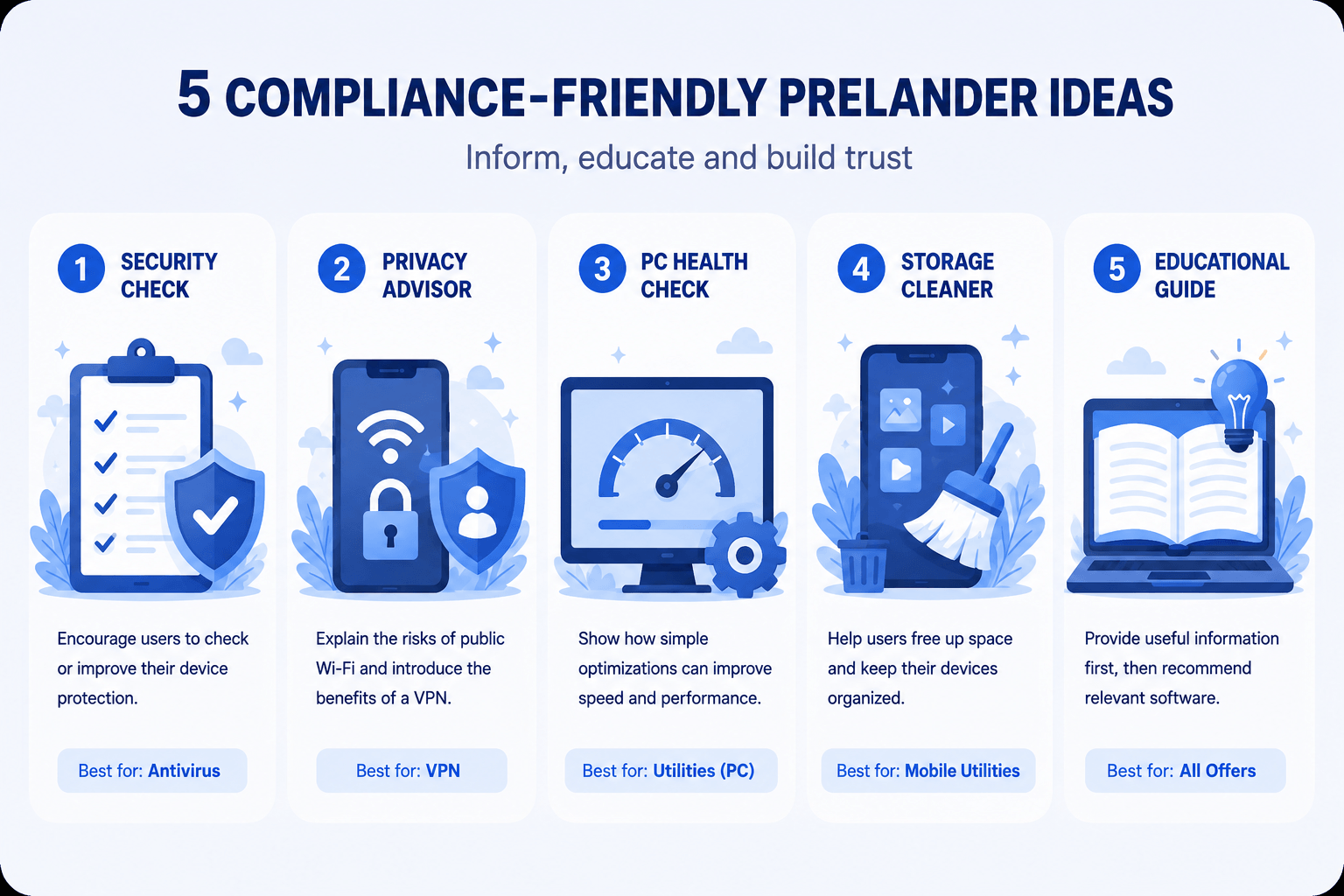
Figure 2. Five compliance-friendly prelander concepts for antivirus, VPN, and utility campaigns.
1. Security Check
A neutral page encouraging users to review or improve their protection.
Example headline:
“Is Your Device Properly Protected?”
Possible CTA:
“Check Protection Options”
Best suited to antivirus and security offers.
2. Privacy Advisor
An educational page about browsing privacy or public Wi-Fi risks.
Example headline:
“Is Your Internet Connection Private?”
Possible CTA:
“Learn How to Browse More Safely”
Best suited to VPN offers.
3. PC Health Check
A page explaining how unnecessary files, startup applications, or outdated drivers may affect performance.
Example headline:
“Could Your PC Run More Efficiently?”
Possible CTA:
“Explore Optimization Tools”
Best suited to desktop utilities.
4. Storage Cleaner
A mobile-focused page about organizing files and freeing up space.
Example headline:
“Running Out of Storage?”
Possible CTA:
“See Storage Cleanup Options”
Best suited to mobile utilities.
5. Educational Guide
An article-style page offering useful information before recommending a product.
Example headline:
“Five Ways to Improve Your Online Security”
Possible CTA:
“View Recommended Tools”
Suitable for antivirus, VPN, and utility offers.
Creative Best Practices
Software creatives should communicate one clear idea quickly.
High-performing concepts often use:
- clean, system-inspired layouts;
- recognizable security, privacy, or utility icons;
- concise headlines;
- one clear benefit;
- a single call to action;
- visual consistency between the ad, prelander, and offer page.
Useful angles include:
- device protection;
- online privacy;
- public Wi-Fi safety;
- storage management;
- PC maintenance;
- file organization;
- performance improvement.
Avoid:
- fake warning windows;
- flashing danger messages;
- false scan results;
- aggressive red screens designed to create panic;
- misleading operating-system branding;
- countdown timers suggesting immediate damage;
- claims that cannot be verified.
The creative should attract attention without creating a false impression about the user’s device.
Match the Offer to the Device
Device targeting is one of the most important parts of a software campaign.
Desktop antivirus and PC utilities should generally be promoted to compatible desktop operating systems. Mobile applications should be sent to users with the correct mobile device and operating system.
Check:
- desktop versus mobile;
- Windows versus macOS;
- Android versus iOS;
- browser compatibility;
- operating-system version;
- language and GEO;
- whether the advertiser’s landing page automatically detects the user’s device.
Sending Android users to a Windows utility offer, for example, wastes traffic and creates a poor user experience.
Keep the Prelander Simple
Users often decide within seconds whether to continue.
A strong prelander usually contains:
- one clear headline;
- a short explanation of the problem;
- two or three benefits;
- a relevant visual;
- one main call to action.
Avoid long paragraphs, several competing buttons, or too many technical details.
The prelander should answer three questions quickly:
- What is this page about?
- Why could it be useful to me?
- What should I do next?
Test Different Angles
The same offer can perform differently depending on the message used.
For an antivirus campaign, you could test:
- general device protection;
- phishing prevention;
- safer online shopping;
- protection for personal files.
For a VPN campaign:
- public Wi-Fi safety;
- privacy while travelling;
- encrypted browsing;
- remote-work security.
For a utility campaign:
- freeing up storage;
- improving startup speed;
- organizing files;
- removing duplicate content.
Test one major variable at a time so you can identify what caused the performance change.
Test GEOs and Traffic Segments Separately
Do not assume that one campaign setup will work equally well in every market.
Separate campaigns by:
- GEO;
- language;
- device type;
- operating system;
- browser;
- traffic source;
- placement;
- connection type, when relevant.
You can test both higher-cost and lower-cost GEOs, but the offer payout, software pricing, user purchasing power, and landing-page localization should support the traffic cost.
For beginners, it is often easier to start with a limited number of GEOs and devices rather than launching one broad campaign with many variables.
Optimize After Collecting Enough Data
Avoid making decisions after only a small number of impressions or clicks.
Track performance across the full funnel:
- impressions;
- visits;
- prelander click-through rate;
- landing-page visits;
- downloads or trials;
- purchases;
- cost per conversion;
- revenue;
- return on ad spend.
Test different:
- creatives;
- headlines;
- prelanders;
- CTAs;
- GEOs;
- devices;
- operating systems;
- browsers;
- placements;
- bids;
- advertiser landing pages, when several are available.
Once enough data is available, reduce spend on weak segments and allocate more budget to combinations that produce conversions at an acceptable cost.
Example Campaign Setup
Here is a simple example for a desktop antivirus offer:
| Traffic: Desktop Popunder Angle: Improve device protection Prelander: System-style security checklist with neutral wording CTA: “View Protection Options” Landing page: Official antivirus product page Conversion: Free trial or purchase Result: Affiliate commission |
A VPN campaign could use a similar structure:
| Traffic: Mobile or desktop Popunder Angle: Safer browsing on public Wi-Fi Prelander: Educational privacy guide CTA: “Learn More About Connection Protection” Landing page: Official VPN offer page Conversion: Subscription |
Common Mistakes Beginners Make
Sending all traffic directly to the offer
Direct linking may work in some cases, but many software offers need additional context. A relevant prelander can explain the benefit and improve the quality of visitors reaching the advertiser.
Using fake virus alerts
Claims such as “27 viruses found” or “your device is infected” are misleading unless based on a genuine scan.
Ignoring device compatibility
Always match the product, prelander, and landing page to the user’s device and operating system.
Using too much text
A prelander is not a technical manual. Keep the message focused and easy to scan.
Testing too many variables at once
When the creative, GEO, device, prelander, and bid all change simultaneously, it becomes difficult to understand what affected the results.
Scaling before verifying conversion quality
A high click-through rate does not always mean a profitable campaign. Optimize for the actual conversion event and revenue, not only for clicks.
Ignoring the offer rules
Advertisers may restrict certain traffic sources, brand terms, creative formats, claims, or GEOs. Review the terms before launching.
Compliance Checklist
Before launching a campaign, confirm that your creatives, prelanders, targeting, and claims comply with both the advertiser’s rules and the traffic source’s policies.
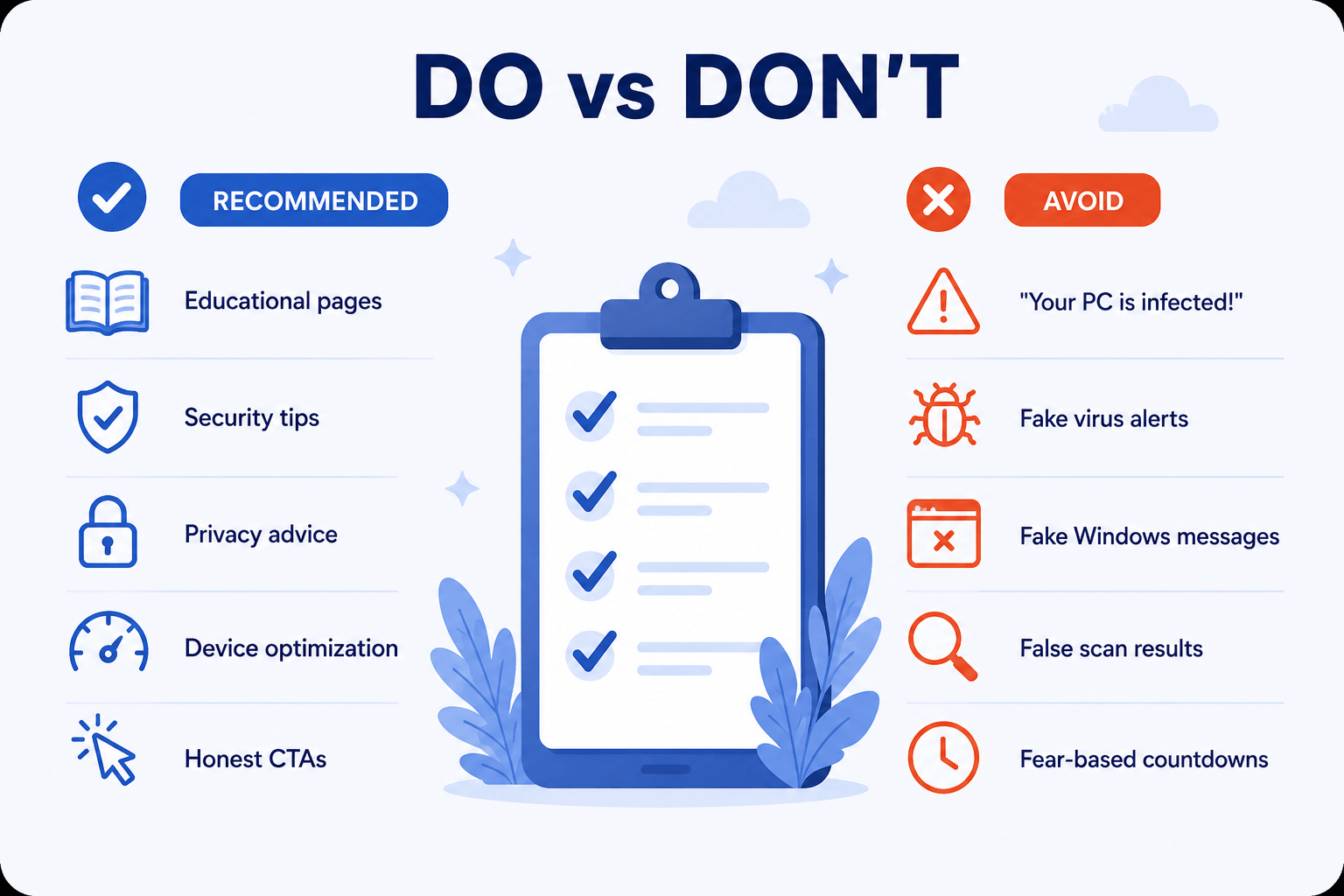
Figure 3. Recommended and prohibited approaches for software prelanders and creatives.
Confirm that:
- the traffic source allows the campaign format;
- the advertiser accepts Popunder or Push traffic;
- your GEOs and devices are permitted;
- the creative does not claim that a device is infected;
- the prelander does not display fake scan results;
- the page does not impersonate an operating system;
- the CTA accurately describes the next step;
- all product claims are truthful and supportable;
- the landing page is compatible with the user’s device;
- you are using approved brand materials where required.
Always review the traffic restrictions for each offer before launching your campaign. Some software advertisers allow Popunder or Push traffic, while others prohibit these traffic sources or require prior approval.
When in doubt, ask your affiliate manager to review the campaign concept before launch.
Final Thoughts
Antivirus, VPN, and utility offers can be a practical starting point for affiliates because they solve problems users already recognize.
A simple funnel —
Popunder or Push → Informational or System-Style Prelander → Official Product Landing Page → Trial, Installation, or Purchase
— can work when every stage is aligned with the user’s device, needs, and expectations.
The most sustainable campaigns do not depend on fake alerts or fear. They use clear targeting, relevant prelanders, honest messaging, and continuous testing to connect users with software that may genuinely help them.
Explore the antivirus, VPN, and utility offers available on Indoleads, review each offer’s promotional rules, test several compliant angles, and scale only the combinations that deliver both conversions and high-quality traffic.
Popular Software Offers Available on Indoleads
If you’re looking for software offers to promote, Indoleads provides access to a wide range of trusted global brands, including:
- Optery personal data removal service — View offer on Indoleads
- Mcafee protection for devices, identity, and privacy — View offer on Indoleads
- Purevpn trusted VPN services. — View offer on Indoleads
- NordVPN — VPN and online privacy — View offer on Indoleads
- Proton VPN — Privacy-focused VPN — View offer on Indoleads
- AdGuard — Ad blocker, VPN, and DNS protection — View offer on Indoleads
- EaseUS — Data recovery, backup, partition management, and PC utilities — View offer on Indoleads
- mSpy — Parental monitoring — View offer on Indoleads
- Eyezy — Digital safety and parental control — View offer on Indoleads
- Spynger — Android monitoring solutions — View offer on Indoleads
Whether your audience is interested in cybersecurity, online privacy, PC optimization, or digital safety, these offers provide multiple opportunities to build compliant, high-converting campaigns.